Designing with Intent: The Canva ENVELOPE Journal Template Folio
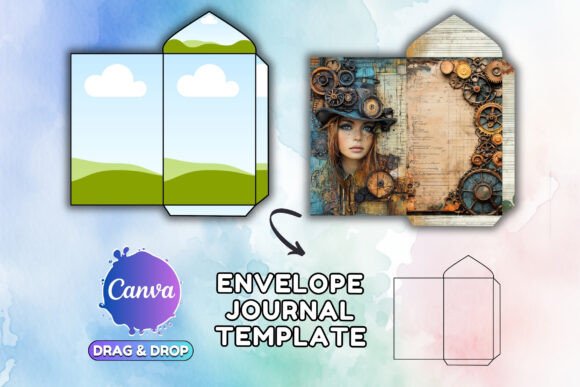
There is a distinct tactile quality to a well-designed journal or notebook that digital screens often struggle to replicate. We crave the texture of paper, the weight of a cover, and the intentional placement of design elements that make a product feel finished. For designers, entrepreneurs, and content creators, bridging the gap between a digital concept and a printable product is a frequent challenge. This is where the Canva ENVELOPE Journal Template Folio enters the conversation, offering a structured yet flexible foundation for those looking to create professional-grade stationery without starting from a blank canvas.
At its core, this template is not merely a collection of pages; it is a design system. The visual personality of the ENVELOPE Journal is defined by its balance of modern minimalism and classic editorial structure. It avoids the trap of over-decoration, instead relying on strong visual hierarchy and clean lines to guide the user's eye. The aesthetic appeal lies in its versatility—it feels equally at home in a corporate boardroom as it does on a cozy writer’s desk. It embodies a sense of modern typography and layout that prioritizes functionality while maintaining a high-end, premium font feel. The layout respects negative space, allowing content to breathe, which is a hallmark of sophisticated editorial design.
Aesthetic Versatility and Project Fit
Understanding where the Canva ENVELOPE Journal Template Folio works best requires looking beyond the surface. Because the template is delivered in both A4 and US Letter sizes, it is immediately primed for global distribution—whether you are creating a physical planner to sell on Etsy or a digital PDF lead magnet for a marketing funnel.
For entrepreneurs and small business owners, this template serves as a powerful tool for brand identity. Imagine a boutique hotel using this folio to create a guest welcome guide, or a life coach designing a workbook for their latest course. The structure of the template ensures that your messaging remains consistent, which is vital for building trust. The design does not scream for attention with loud graphics; rather, it whispers authority through clean composition.
For crafters and hobbyists, the appeal is in the personalization. The template acts as a sophisticated skeleton. You are not just filling in blanks; you are curating an experience. The visual style is adaptable enough to accept bold, colorful artwork for a children’s activity book or muted, earthy tones for a mindfulness journal. It supports various design assets, allowing you to layer textures and illustrations over the existing framework without clashing.
Influence on Brand Perception and Engagement
Typography and layout are silent ambassadors of a brand. When a user interacts with a document built on the Canva ENVELOPE Journal Template Folio, they are subconsciously processing the professionalism of the design. A cluttered layout suggests chaos, while a well-structured template suggests competence and clarity.
The "envelope" concept implies protection and value—what is inside is precious. By utilizing this template, creators can elevate their perceived value. In the realm of digital products, perceived value is everything. A PDF that looks like a hastily typed Word document will struggle to sell for $20, whereas a polished folio designed with this template can command a premium price point. The design facilitates readability by providing clear zones for text and imagery, reducing cognitive load for the reader. This improved visual hierarchy ensures that your call-to-action—whether it is "Buy Now" or "Reflect on your week"—is seen and acted upon.
Furthermore, consistency breeds recognition. If you are a blogger or content creator, using this template style across your media kits, press releases, and subscriber freebies creates a cohesive ecosystem. Your audience begins to recognize your "look" before they even read the text. This is the essence of strong brand identity—visual consistency that translates into audience loyalty.
Practical Application and Customization
The process of utilizing this asset is streamlined for efficiency. Upon purchase, you receive a PDF containing an access link. Clicking this link directs you straight into the Canva editor, provided you have a free account. This immediate accessibility is crucial for fast-paced workflows.
Once inside Canva, the customization options are vast. The template is designed with editable frames, which are essentially placeholders for your content. This is where you can inject your unique style. Consider these practical applications:
- Logo Design Integration: Place your vector logo in the header or footer areas to instantly brand the document.
- Packaging Design Elements: If you are creating a journal to sell, use the cover page to experiment with packaging design concepts. Test how your box art or sleeve design might look in a flat layout.
- Social Media Graphics: Use individual pages of the template as social media graphics. A single, beautifully typeset page from the journal can serve as an Instagram post or a Pinterest pin to drive traffic to your shop.
When it comes to font pairing, the template provides a solid baseline. However, you should feel empowered to experiment. If the template uses a sans serif font for headers, try pairing it with a serif font for body text to create a classic contrast. Alternatively, swapping the header font for a script font or handwritten font can soften the aesthetic, making it suitable for wedding invitations or personal diaries. The goal is to maintain readability while infusing personality.
Commercial Viability and Licensing
For those looking to monetize their designs, the licensing of the Canva ENVELOPE Journal Template Folio is permissive regarding the end product but strict regarding the asset itself. You are fully authorized to use these files for both personal and commercial purposes. This means you can sell the final PDF or printed journal to your customers.
However, the terms are clear: you cannot resell the template file itself. You cannot give the Canva link away, nor can you incorporate the raw template into another digital product or template pack for sale. This protects the integrity of the asset and ensures that your final product remains unique to your brand.
From a web design perspective, this template can also serve as a prototype. Before investing in custom web development, use the journal layout to map out content flow for a landing page. The grid systems often found in high-quality design assets like this folio can translate directly to responsive web layouts.
Final Thoughts on the Creative Process
The Canva ENVELOPE Journal Template Folio is more than a digital file; it is a catalyst for production. It removes the friction of layout design, allowing you to focus on what truly matters: your content. Whether you are a marketer crafting a lead magnet, a designer building a portfolio piece, or a hobbyist organizing your thoughts, this tool offers a professional edge.
By leveraging the clean lines and structured nature of this template, you ensure that your work communicates quality. In a saturated market, the details matter. The way text sits on a page, the balance of white space, and the consistency of branding elements all contribute to a successful end product. This template provides the framework; you provide the vision.