Perfect Your Custom Cap Designs with the Hat Brim Template Bundle
Why Blank Hat Templates Are a Game-Changer for Crafters
Creating custom hats used to require either expensive professional equipment or a lot of guesswork. You'd measure, cut, re-measure, and still end up with a crooked brim or a template that didn't quite fit. The Hat Brim Template Bundle changes that entire process. It gives you a set of precision-designed blank hat templates that actually match the real dimensions of trucker hats, baseball caps, and other popular hat styles.
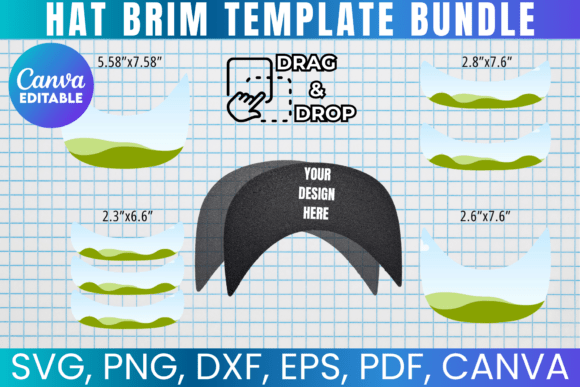
What makes this bundle stand out is the attention to detail. Each template is carefully sized to fit standard 8.5"x11" sheets, so you can print them at home without worrying about scaling issues. The Hat Brim SVG files are clean and properly structured, which means they import smoothly into Cricut Design Space, Silhouette Studio, and other cutting software. No weird artifacts, no misaligned paths, no frustrating troubleshooting sessions at midnight.
For anyone running a small hat business, doing custom orders, or simply exploring hat design as a creative outlet, having reliable templates saves hours. You spend less time fixing technical problems and more time actually designing. That's the real value here—not just the files themselves, but the workflow improvement they bring to your projects.
What's Included and How Each File Format Serves You
The Hat Brim Template Bundle includes multiple file formats because different creators use different tools. Here's a quick breakdown of what you get and why each format matters:
- SVG file works with Cricut, Silhouette, CorelDraw, Inkscape, and most vector-based design software. This is the format most cutting machine users rely on because it maintains clean edges at any size.
- PNG file comes with a transparent background, making it ideal for layering in Photoshop, Canva, or any raster-based editor. You can drop it directly onto your mockup without worrying about removing a white box around it.
- DXF file is specifically formatted for Silhouette Studio users. If you own a Silhouette machine, this is the file type that imports most reliably.
- PDF file includes a white background, perfect for printing a physical template you can trace by hand. Some crafters still prefer the tactile approach, and this file supports that workflow.
- Canva link lets you edit the template through a simple drag-and-drop interface. If you're not comfortable with professional design software, this is your easiest entry point.
Having all these formats means you're not locked into one ecosystem. You can start in Canva, move to Cricut for cutting, and use the PNG for social media mockups—all from the same bundle. That kind of flexibility matters when you're juggling different stages of a project.
Real Applications: From Sublimation to DIY Projects
The blank hat templates in this bundle work across several popular crafting methods. Sublimation is one of the most common. If you're printing custom designs onto polyester hat panels, you need to know exactly where your artwork will land on the brim. These templates give you that precision. You can design your pattern in Adobe Photoshop or Illustrator, overlay it on the Hat Brim SVG, and see exactly how it will look before you commit to printing.
Cricut and Silhouette users benefit from the clean vector paths. When you're cutting heat transfer vinyl or adhesive materials for hat decoration, even a small offset in your template can ruin a piece. The Hat Brim Template Bundle files are built with accurate measurements, which reduces waste and rework. If you've ever ruined a sheet of premium vinyl because your template was off by a quarter inch, you understand why this matters.
For printable DIY projects, the PDF format lets you print, cut, and use the template as a physical guide. This works well for hand-sewn projects, fabric cutting, or simply planning out where embellishments like patches or embroidery will go. It's a low-tech solution that still benefits from the digital precision behind the design.
Practical Tips for Getting the Most Out of Your Templates
A few things worth knowing before you start: basic familiarity with your chosen design software is helpful. The bundle doesn't include step-by-step tutorials, but the files are straightforward enough that most users can figure them out quickly. If you're using Cricut, you may need to manually adjust the sizing after importing the SVG. The included measurements make this easy—just match the dimensions to what's listed and you're set.
One approach I recommend is creating a test cut first. Load your template, cut a piece of scrap material, and hold it up against an actual hat brim. This quick check confirms that your software is interpreting the file correctly and that your machine's calibration is accurate. It takes five minutes and can save you an entire sheet of material.
Also consider building a small library of your favorite hat styles. Once you've used the Hat Brim Template Bundle for a few projects, you'll develop preferences. Maybe the trucker hat template becomes your go-to for promotional giveaways, while the baseball cap brim template works best for sports team designs. Documenting what works for you creates a repeatable process that speeds up future orders.
Who Benefits Most from This Bundle
Small business owners selling custom hats online find these templates invaluable for consistency. When every order needs to look professional, having reliable design assets removes a major variable from production. Content creators and bloggers who feature DIY tutorials can use the blank hat templates to demonstrate techniques clearly, showing readers exactly where to place designs.
Marketers and brand strategists working on promotional merchandise appreciate the precision too. A well-placed logo on a hat brim looks intentional and polished. A poorly placed one looks like an afterthought. The Hat Brim SVG gives you the foundation to get that placement right every single time.
Hobbyists and weekend crafters aren't left out either. If you're making hats for a family reunion, a local sports team, or just for fun, these templates remove the technical barrier. You don't need to be a professional designer to produce clean, well-fitted custom hats. The bundle meets you where you are, whether that's Canva or CorelDraw.
The one-time payment model means you buy it once and use it forever. There are no subscriptions, no renewal fees, and no usage limits within the personal use license. For the price of a single blank hat, you get a toolkit that supports hundreds of projects. That's a practical investment for anyone serious about hat customization.