Galaxy S25 Case Templates: Streamline Your Design Workflow
Designing a custom phone case, whether for a new product line or a personal passion project, often hits a snag at the very first step: the template. Finding an accurate, properly sized template for the specific device you’re targeting can be a time-consuming hunt. This is where the S25 Case Canva Template Bundle steps in, offering a direct solution for creators working with the latest Samsung Galaxy S25 series. It’s a set of digital design assets built to remove guesswork and get you straight to the creative work.
What Exactly Is This Template Bundle?
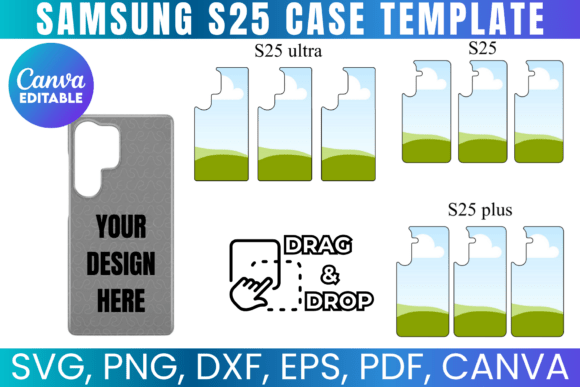
Think of the S25 Case Canva Template Bundle as a digital starter kit for case design. It provides a collection of precisely measured, blank templates for the Samsung Galaxy S25, S25+, and S25 Ultra. Each template is a layer-ready file that maps the exact printable area of the phone case, including cutouts for cameras, ports, and buttons. The visual style is intentionally minimal—a clean, blank canvas. Its "personality" is purely functional, designed to be a reliable foundation rather than a finished design.
The bundle’s appeal lies in its practicality. Instead of spending hours measuring a physical case or tracing an outline from an image, you get a file that’s ready to go. This is particularly valuable for entrepreneurs launching a case line or designers managing multiple client projects. The templates are formatted to fit a standard 8.5"x11" sheet, making them compatible with home printers and professional printing services alike. This thoughtful sizing bridges the gap between digital design and physical production.
Where and How to Use These Design Assets
The true strength of this bundle is its versatility across file formats. The inclusion of a Canva link is a standout feature for those who prefer a browser-based, drag-and-drop environment. You can open the template directly in Canva, import your artwork or patterns, adjust positioning, and export a print-ready file without needing specialized software. This makes it an excellent tool for bloggers creating merchandise, small business owners prototyping designs, or hobbyists who want a straightforward creative process.
Beyond Canva, the bundle caters to a wider ecosystem of design tools. The SVG and DXF files are essential for crafters using cutting machines like Cricut or Silhouette. You can use these to create precise vinyl decals or stencils. The PNG file with a transparent background integrates seamlessly into more advanced graphic design software like Adobe Photoshop or Illustrator, allowing you to layer your design over mockups or combine it with other elements. The PDF offers a simple, print-friendly option with a white background, ideal for proofing.
Consider a few practical applications: A graphic designer could use the Canva template to quickly mock up three different pattern options for a client, presenting them on a realistic phone outline. A print-on-demand entrepreneur could use the SVG file in Silhouette Studio to set up a batch of designs for automated cutting. A crafter could use the PNG in Procreate on an iPad to hand-draw a unique illustration directly onto the template layer. This flexibility in application supports a wide range of creative and commercial workflows.
Integrating Templates Into Your Creative Process
Using a template like this effectively is about more than just having the file. It’s about incorporating it into a smooth design process. Start by evaluating your project’s needs. Are you creating a one-off custom case for a gift, or are you developing a scalable product line? For a single project, the Canva link might be all you need. For a business, having the SVG and PNG files allows for greater precision and integration with professional printing and cutting equipment.
A key consideration is readability and visual hierarchy—not of text, but of your design itself. The template helps you define the "safe zone" for your artwork. You’ll want to ensure key elements of your pattern or illustration fall within this area and aren’t lost under the phone’s camera bump or along the curved edges. Testing your design by printing a draft on plain paper is a simple, effective way to check placement before committing to a final print on specialized case material.
When it comes to font pairing and typography—if you’re adding text to your case design—this is where the template becomes a layout tool. You can use it to experiment with how a bold, modern sans-serif typeface for a brand name sits within the case’s contours, or how a delicate script font for a personal message flows around the camera cutout. The template allows you to visualize how your typographic choices interact with the physical product’s shape, which is a critical step often overlooked in flat digital design.
Ultimately, the S25 Case Canva Template Bundle functions as a foundational design asset. It doesn’t dictate your creative direction but instead supports it by handling the technical specifications. This allows you to focus on what matters: the artwork, the branding, and the final product. By providing accurate, multi-format files, it helps maintain professionalism and consistency across your projects, whether you’re crafting a single gift or building a brand identity from the ground up.