Skinny 20oz Tumbler Canva Mockup: Professional Product Photos Made Simple
Creating stunning product photos for your tumbler business used to require expensive photography equipment, professional lighting setups, or hiring a photographer for every new design. The Skinny 20oz Tumbler Canva Mockup changes all of that. This customizable template bundle gives you everything needed to produce polished, professional-looking product images directly inside Canva—no advanced software skills required.
What Makes This Mockup Bundle Stand Out
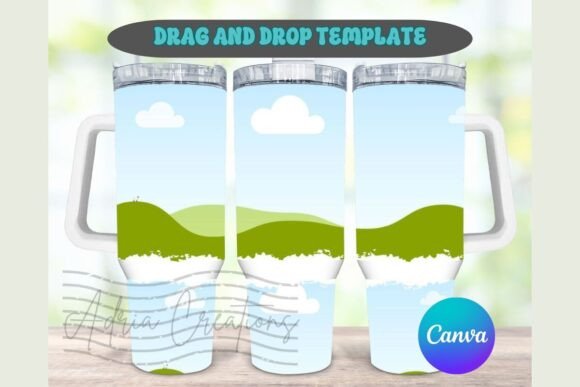
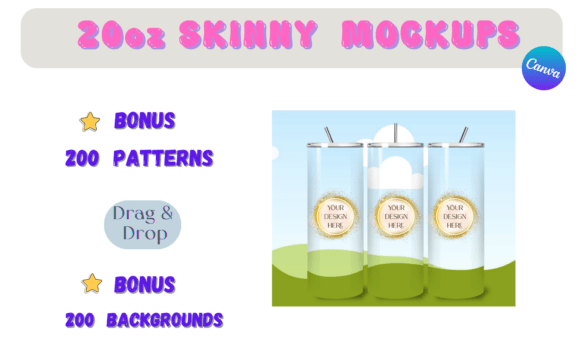
At its core, this package centers around a carefully crafted mockup template designed specifically for skinny 20oz tumblers. The template captures the elongated, slender profile that has become hugely popular in the drinkware market. Unlike generic flat-lay photos or awkward smartphone snapshots, this mockup presents your tumbler designs in a realistic, three-dimensional perspective that looks like it came straight from a professional product shoot.
The visual quality speaks for itself. Shadows fall naturally, highlights catch the curved surface convincingly, and the overall composition gives your artwork the space it deserves. Whether you are showcasing a floral wrap, a monogram design, or an intricate pattern, the template handles it beautifully without distorting or warping your graphics.
What You Get Inside the Package
This bundle goes well beyond a single template. Here is what comes included:
- 1 Mockup Template – A polished, ready-to-use skinny tumbler mockup optimized for Canva's editing environment.
- 200 Bonus Backgrounds – A massive library of backgrounds ranging from clean studio setups to lifestyle scenes, giving your product photos instant variety.
- 100 Leopard and Zebra Patterns – Bold, trendy animal prints ready to apply directly to your tumbler designs or use as accent elements.
- 100 Marble Patterns – Elegant, sophisticated marble textures that pair beautifully with metallic accents and modern typography.
- 1 Video Tutorial – Step-by-step guidance walking you through the entire process of creating your own mockups, perfect for anyone who learns visually.
That combination of assets means you are not just buying a single-use template. You are investing in a design toolkit that supports dozens of product variations, seasonal campaigns, and branding experiments over time.
How to Use the Drag-and-Drop System
The beauty of working inside Canva is its accessibility. You do not need Adobe Photoshop, Illustrator, or any subscription to professional design software. The Skinny 20oz Tumbler Canva Mockup works entirely within Canva's free or Pro environment.
The workflow is straightforward:
- Open the mockup template in Canva.
- Upload your tumbler design or select one of the included patterns.
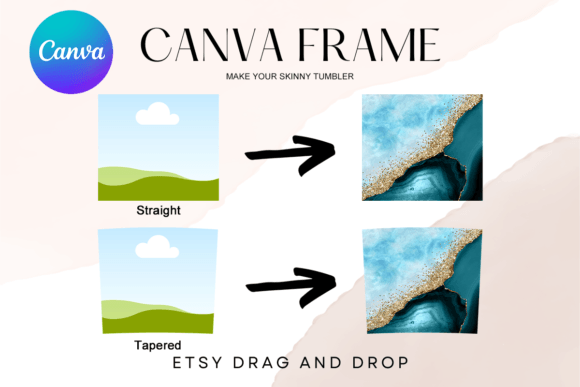
- Drag your artwork onto the tumbler surface.
- Adjust positioning, scale, and rotation until the wrap looks right.
- Swap out the background using one of the 200 included options or upload your own.
- Download your finished image as a PNG or JPG.
The video tutorial walks through each of these steps in detail, so even if you have never touched a mockup before, you will feel confident after watching it once. The drag-and-drop functionality eliminates the learning curve that typically comes with product photography or advanced editing tools.
Who Benefits Most from This Bundle
This mockup package serves a wide range of creative professionals and small business owners. If you sell custom tumblers on Etsy, Shopify, or at local craft fairs, having consistent product photography makes an enormous difference in how customers perceive your brand. Clean, professional images build trust and help buyers visualize the finished product in their hands.
Designers who create tumbler wraps for clients will find this especially useful. Instead of sending flat artwork files and hoping the client can imagine the final result, you can present your design rendered on an actual tumbler. That kind of presentation elevates your work and often speeds up the approval process.
Content creators, bloggers, and social media managers also benefit. Product mockups make excellent visual content for Instagram posts, Pinterest pins, email campaigns, and website banners. A single design can generate multiple images simply by swapping backgrounds or adjusting the composition slightly.
Why Background Variety Matters More Than You Think
Two hundred backgrounds might sound like overkill, but seasoned product photographers know that context sells. A tumbler shown against a rustic wooden table communicates something entirely different than the same tumbler against a marble countertop or a bright, colorful gradient. Each background tells a different story and appeals to a different buyer.
The included leopard, zebra, and marble patterns add another layer of creative possibility. You can apply these directly to the tumbler surface for quick design variations or use them as background elements that complement your primary artwork. A marble pattern background paired with a gold-foil monogram design, for example, creates an upscale, gift-ready aesthetic that photographs beautifully for holiday promotions.
Practical Tips for Getting the Best Results
After spending time with mockup templates like these, a few best practices tend to emerge. First, keep your artwork resolution high. Even though Canva handles resizing reasonably well, starting with a crisp, clean design file ensures the final mockup looks sharp at full size. Blurry or pixelated source artwork will show up in the finished image no matter how good the template is.
Second, pay attention to color harmony between your design and the chosen background. A busy, multicolored tumbler design competes visually against a detailed background. In those cases, a simple solid-color or softly blurred background lets the artwork take center stage. Conversely, a minimalist single-color design can benefit from a more textured or atmospheric background that adds visual interest.
Third, use the included video tutorial even if you feel comfortable navigating Canva. Small tips and techniques—like how to adjust the mockup's shadow intensity or align a wrap pattern seamlessly—can make a noticeable difference in the final output.
Building a Consistent Brand Identity Through Mockups
Consistency across your product images strengthens your brand identity more than most people realize. When every listing on your shop page uses the same mockup style, lighting quality, and background aesthetic, the entire storefront feels cohesive and professional. Customers browsing your products get a sense of reliability and attention to detail before they even read a product description.
The Skinny 20oz Tumbler Canva Mockup supports that consistency by giving you a single, reliable template that works across all your designs. Rather than reshooting products every time you release a new pattern or colorway, you simply drop the new artwork into the same template. The framing stays the same. The lighting stays the same. Only the design changes, which keeps the focus exactly where it belongs.
A Smart Investment for Growing Tumbler Businesses
For anyone running a tumbler business or offering design services in the drinkware space, this mockup bundle delivers real, practical value. The combination of a high-quality template, extensive background library, bonus patterns, and a guided tutorial covers the full spectrum of product presentation needs. You save time, reduce costs associated with professional photography, and gain the flexibility to experiment with new designs and marketing visuals on your own schedule.
The ability to edit everything in Canva means you can work from anywhere—your desktop at home, a laptop at a coffee shop, or even a tablet on the go. No specialized software, no steep learning curve, and no recurring subscription fees beyond what you already use. That accessibility alone makes this package worth serious consideration for anyone serious about presenting their tumbler designs professionally.