Design Unforgettable Travel Surprises with a Canva Template
In the world of digital design, some projects carry more emotional weight than others. While a standard business card serves a function, a personalized boarding pass for a surprise vacation or a milestone celebration carries the promise of adventure. For designers, entrepreneurs, and creative hobbyists, the challenge often lies in balancing professional polish with the warmth of a personal gift. This is where a versatile Boarding Pass Canva Template becomes an indispensable asset in your design toolkit.
Forget the limitations of rigid, pre-printed stationery. Modern design demands flexibility, and this is where the "DIY Digital Ticket" concept shines. Whether you are a small business owner creating unique party favors or a partner planning a romantic getaway reveal, the ability to instantly download and manipulate a template offers a level of control that static designs simply cannot match.
Visual Character and Aesthetic Appeal
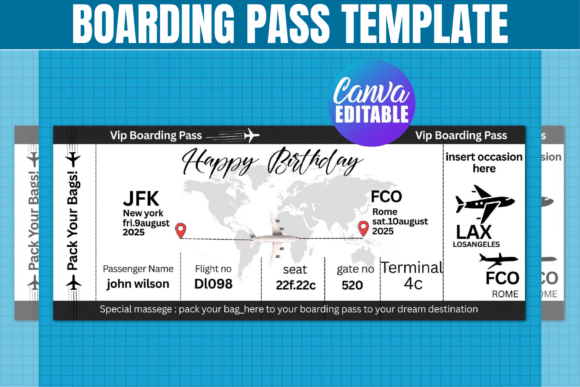
At its core, the Boarding Pass Canva Template is designed to mimic the authentic feel of modern airline ticket designs while retaining a playful, customizable spirit. Visually, these templates often feature a balanced mix of structured typography and decorative elements. You will typically find clean sans-serif fonts for the critical data—flight numbers, times, and destinations—paired with more expressive display fonts or script fonts for headers like "Bon Voyage" or "You're Going to Paris!"
The layout usually adheres to the classic horizontal orientation of a boarding pass, utilizing negative space effectively to prevent the design from feeling cluttered. The personality of the template is inherently optimistic and exciting; it is a visual representation of movement and new beginnings. For the designer, this provides a ready-made visual hierarchy. The "boarding area" and "seat" sections aren't just decorative; they are functional containers for your custom text, ensuring that even if you change the color palette or fonts, the design remains grounded in a recognizable format that resonates immediately with the viewer.
Practical Applications: Beyond the Surprise Trip
While the most obvious use case is revealing a surprise vacation to a loved one, the utility of a premium Boarding Pass Canva Template extends far into commercial and creative realms. As a creative professional, understanding these applications can help you maximize the value of your design assets.
Event Marketing and Invitations: For event planners or marketers, a boarding pass design is a powerful metaphor for a "journey." It works exceptionally well for gala dinners, travel-themed weddings, or corporate retreats. By using the editable Canva link, you can quickly input event details, dress codes, and RSVP information into the ticket slots.
Small Business and Packaging: If you run a travel agency, a luggage brand, or a lifestyle blog, these templates can be adapted into loyalty cards, discount vouchers, or gift certificates. The association with travel adds a layer of perceived value to the physical item.
Party Favors and Decor: For the hobbyist or crafter, the included SVG and DXF files are crucial. These allow you to import the design into Cricut Design Space or Silhouette Studio to cut physical boarding passes from cardstock. This creates a tactile experience for the recipient, turning a simple piece of paper into a keepsake.
Technical Flexibility and Software Compatibility
One of the most significant advantages of a modern Boarding Pass Canva Template is its cross-platform compatibility. We live in a multi-software environment; a designer might sketch in Procreate, refine in Adobe Illustrator, and hand off a project in Canva for a client to manage.
This specific type of template bridges the gap between professional vector software and accessible web-based editors. The inclusion of an SVG file ensures that the design is scalable for large-format printing or precise cutting paths in vector software like CorelDraw or Inkscape. Conversely, the PNG file with a transparent background is perfect for layering the boarding pass over travel photography in social media graphics or blog posts.
However, the Canva link is often the star of the show for the modern content creator. It democratizes the editing process. You do not need to be a master of Adobe Photoshop to change the font pairing or adjust the color scheme to match a specific brand identity. This ease of use does not mean a sacrifice in quality; it simply means that the heavy lifting of layout and composition has been handled by a professional, allowing you to focus on the personalization.
Design Strategy: Typography and Readability
When working with ticket designs, readability is paramount. A boarding pass is an information-dense format. It contains a "To," "From," "Date," and "Time," often in a small footprint. When customizing your Boarding Pass Canva Template, pay close attention to the visual hierarchy.
Keep the critical travel details in a clean, legible sans-serif typeface. This ensures that the "surprise" information (the destination) is easy to read at a glance. For the decorative elements, such as the passenger name or the airline logo, you can afford to be more expressive. Using a handwritten font or a modern script can soften the industrial feel of a standard ticket, making it feel more like a personal invitation and less like a bureaucratic document.
Consider the "brand" of the event. If this is for a high-end bachelorette party, a minimalist aesthetic with gold foil accents (simulated via color choices) might work best. If it’s for a child’s birthday trip to Disney, you might lean into bold, primary colors and playful typography. The template serves as the skeleton; your typography choices provide the flesh and personality.
Commercial Use and Licensing Considerations
For entrepreneurs and small business owners, the licensing terms of design assets are a critical consideration. It is important to note the distinction between the digital file and the physical product. Generally, with templates of this nature, you are granted a license for personal use and, often, for small business use regarding physical items.
For example, if you are a travel agent, you can likely print these boarding passes to give to your clients as part of a booking package. However, you typically cannot resell the digital SVG or Canva link itself to other designers. Understanding this distinction allows you to use the Boarding Pass Canva Template as a value-add for your services—enhancing your client experience—without violating intellectual property rights. Always review the specific "Usage Terms" included with your download to ensure your business model aligns with the license.
Final Thoughts on the DIY Approach
The shift toward DIY digital tickets and editable templates represents a broader trend in design: the blending of professional quality with personal touch. A Boarding Pass Canva Template is more than just a graphic; it is a vessel for storytelling. It allows you to take the concept of travel—which is inherently about experience and memory—and package it in a tangible format.
Whether you are a crafter cutting intricate designs on cardstock or a marketer designing a social media campaign, the principles remain the same. Focus on clarity, respect the visual hierarchy of the layout, and use the available software tools to tailor the design to your specific audience. By doing so, you transform a simple template into a powerful piece of communication that excites, informs, and delights.