Custom Pet Tags with Canva Frame Templates
Creating personalized pet tags for your small business or personal projects used to require expensive software and specialized skills. Now, with tools like the Dog Tag Canva Frame Template Pet Tag, you can design professional-looking tags directly in your browser. This digital asset provides a streamlined workflow for producing custom pet identification tags, memorial pieces, or branded merchandise. It’s a practical solution for anyone from a home-based crafter to a pet shop owner looking to offer a new service. The appeal lies in its simplicity and accessibility, allowing you to focus on the creative design rather than technical hurdles.
Understanding the Digital Asset
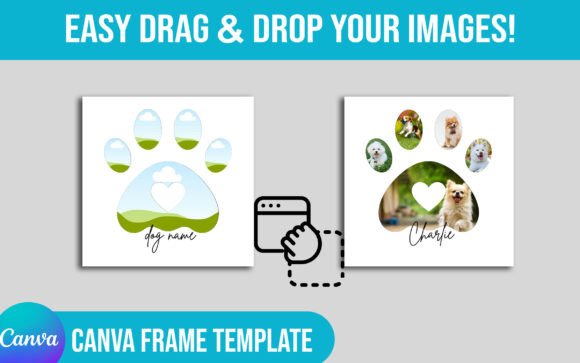
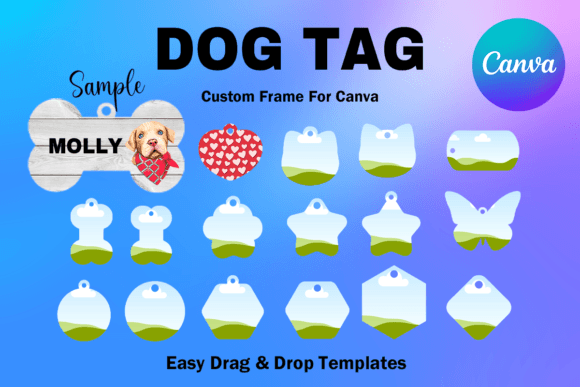
First, it's crucial to understand exactly what you're receiving. This is not a physical product or a simple image file like a PNG or SVG. The Dog Tag Canva Frame Template Pet Tag is a digital file—specifically, a PDF containing a direct link to a set of 17 custom-made Canva frame templates. Once you click the link, the templates open in Canva, a popular and user-friendly online design platform. Each template is designed on an 8.5x11 inch canvas, with individual tag frames sized at approximately 1.3x1.3 inches. This standard paper size makes it easy to print multiple tags on a single sheet for sublimation or vinyl projects. The frames feature a transparent layer, which is essential for clean transfers in sublimation printing, as only your design will be transferred to the tag.
Practical Applications and Creative Freedom
The true value of this template pack is in its versatility. As a design asset, it fits into numerous workflows. For entrepreneurs and small business owners, it’s a direct path to creating a new product line. A pet grooming salon could offer custom ID tags at the counter. A graphic designer could add pet tag design to their list of services. Crafters and hobbyists will find it perfect for making heartfelt gifts for friends with new puppies or as memorial tags. The drag-and-drop nature of Canva means you don't need to be a professional designer. You can easily add pet names, phone numbers, and even small icons or logos directly onto the frame. The ability to size the templates up or down provides flexibility for different tag blanks you might source.
From a branding perspective, the style of the tag itself communicates something. The frame's shape and clean lines suggest a modern, approachable, and caring aesthetic. For a business, using these templates consistently can help build brand recognition. Imagine a pet bakery that includes a custom-designed tag with every specialty cake order—it becomes a memorable part of the customer experience. The templates ensure visual consistency across all your tags, which projects a sense of professionalism. This consistency is a cornerstone of effective brand identity, making your products or services instantly recognizable.
Integrating into Your Design Workflow
When you first open the templates in Canva, take a moment to explore the 17 variations. They likely offer different layout options—some might have the text field centered, others aligned to the top or bottom. This variety is a strength, allowing you to choose the best visual hierarchy for each specific design. A tag with a long pet name might work better with a stacked layout, while a short name and number could look balanced in the center. The transparent layer is your active design area. Treat it like a mask. Anything you place inside it will be "cut out" in the final design, which is exactly what you need for sublimation.
A key piece of advice: test your designs before committing to a full print run. Use Canva's download function to save a test image. Print it on regular paper to check the sizing against your physical tag blanks. Does the text look legible at the final size? Is the spacing comfortable? This step is part of good readability considerations. While you're not choosing a serif font or sans serif font for the frame itself, the font you select for the pet's name inside the template is critical. Opt for a clean, bold typeface that remains easy to read even when small. Avoid overly ornate script fonts or handwritten fonts for essential information like phone numbers, as they can become illegible.
From Concept to Finished Product
The process is straightforward: customize the template in Canva, download your design, and then use it with your chosen production method. For sublimation, you would print the design onto sublimation paper with a sublimation printer and then heat-press it onto a polyester-coated or sublimation-ready metal tag. The transparent layer in the Canva template ensures only your text and graphics transfer, leaving the metal tag's border clean. For vinyl, you might cut the text from adhesive or heat-transfer vinyl and apply it to a blank tag, using the template design as a precise guide for placement.
Remember, the Dog Tag Canva Frame Template Pet Tag is a starting point. Its greatest power is that it removes the technical barrier of creating the base frame shape, freeing you to focus on the creative customization that makes each tag unique. Whether you're building a product catalog, creating party favors, or starting a side hustle, this digital tool provides a practical and efficient foundation for your projects.