Create Your Own Cookbook: A Modern Recipe Book Template
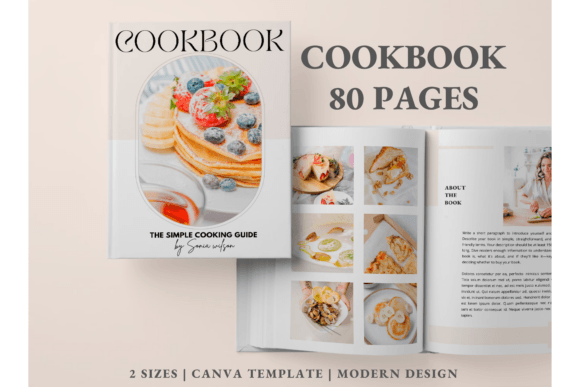
For food bloggers, chefs, and home cooks, a physical cookbook is a powerful piece of brand identity. However, the design process can be daunting. This is where the Cookbook Template | Recipe Book Canva comes in. It offers a modern, clean, and minimalist aesthetic that allows you to focus on your content rather than struggling with layout software. With 80 pre-designed pages, this template provides a professional foundation for anyone looking to publish a high-quality recipe book without hiring a graphic designer.
Visual Style and Modern Appeal
The design philosophy behind this template prioritizes clarity and elegance. It avoids clutter, using ample white space to let your food photography and recipes take center stage. The overall personality is approachable yet sophisticated, making it suitable for everything from a family heirloom collection to a professional chef's portfolio. The style leans into modern typography trends, balancing clean sans serif fonts for body text with elegant display fonts for headings. This combination ensures high readability while maintaining a polished, contemporary look.
Design Assets and Editable Elements
What makes the Cookbook Template | Recipe Book Canva particularly valuable is its flexibility. Every element is customizable within Canva, a free-to-use design platform. You aren't locked into a rigid structure. Instead, you have access to a suite of design assets that you can manipulate to fit your specific brand identity.
- Typography Control: You can easily swap out the default typeface for any font available in Canva’s library. Whether you prefer a bold serif font for a traditional feel or a playful handwritten font for a casual vibe, the template adapts.
- Image Integration: The layout is built for photography. You can upload high-resolution images, adjust their size, apply filters, and crop them to fit the designated frames perfectly.
- Color and Backgrounds: Change the background colors to match your brand palette or add patterns and textures for visual interest.
- Structural Elements: Move, resize, and rearrange shapes, lines, and icons to create a custom hierarchy that guides the reader's eye through your instructions.
Practical Applications for Creators and Businesses
This template is more than just a digital document; it is a versatile design asset. Its applications extend across various industries, making it a practical tool for different types of creators and entrepreneurs.
For Food Bloggers and Content Creators
If you have a backlog of recipes on your blog, compiling them into a PDF or print book is an excellent way to monetize your content. The Cookbook Template | Recipe Book Canva allows you to repurpose your existing content into a premium digital product. The included "Table of Content," "About Me," and "Connect with Us" pages help structure the book professionally, turning a simple collection of recipes into a cohesive brand story.
For Small Business Owners and Chefs
Restaurants, bakeries, and catering companies can use this template to create branded merchandise or client gifts. A well-designed cookbook reinforces brand perception and professionalism. The inclusion of a "Meal Planner" and "Grocery List" adds practical utility for the end-user, increasing the value of the final product. The template’s clean layout ensures that even complex recipes are presented in a digestible format, minimizing user frustration.
For Personal Projects and Gifting
On a personal level, this tool is perfect for preserving family recipes. Instead of letting handwritten cards fade, you can digitize them into a beautiful keepsake. The 48 recipe pages provide ample space for a comprehensive collection, and the customizable cover designs allow you to create a truly personal gift for weddings, holidays, or family reunions.
Key Features and Functionality
The Cookbook Template | Recipe Book Canva is structured to provide a complete publishing solution. It is optimized for A4 (210×297 mm) sizing, which is a standard for both print and digital PDF distribution. The package includes specific pages designed to round out the reading experience:
- 10 Book Covers: Choose from ten distinct cover designs to find the one that best represents your culinary style.
- 5 Chapter Covers: Organize your book into sections—such as Appetizers, Mains, and Desserts—with dedicated divider pages.
- Specialty Pages: Beyond recipes, the template includes an "Article Page" for storytelling, a "Cooking Tip" section for expert advice, and a "Grocery List" for practical utility.
- Brand Building: The "About the Book" and "Connect with Us" pages are essential for creators looking to drive traffic back to their websites or social media channels.
Designing for Readability and Engagement
When creating a recipe book, visual hierarchy is critical. A reader needs to quickly distinguish between ingredients and instructions. The default layout of this template handles this well, but understanding the principles behind it will help you customize it effectively.
When editing, pay attention to the contrast between your headings and body text. Using a bold sans serif font for ingredients and a lighter weight for instructions can improve scanning speed. Furthermore, ensure that your text color contrasts sufficiently with your background. While pastel backgrounds might look trendy, they can reduce readability if the text isn't dark enough. The template’s clean grid system helps maintain alignment, ensuring that even if you change the fonts, the page remains organized and easy to navigate.
Getting Started with Your Cookbook
You do not need advanced design skills to use this template. A free Canva account is all that is required to access and edit the file. The process is straightforward: click the provided link, the template opens in Canva, and you can begin swapping out text and images immediately.
Whether you are a professional marketer looking to create a lead magnet, a hobbyist preserving your favorite dishes, or a designer building a portfolio piece, the Cookbook Template | Recipe Book Canva offers a flexible, high-quality starting point. It removes the technical barriers of publishing, allowing you to focus on what matters most: the food and the stories behind it.